 How To Use Ableton’s -To-MIDI Feature On Your Drum Loops
Over the last few years no major DAW has gained more steam and popularity than Ableton Live, and rightfully so, as it is the most complete audio workstation available right now.
Using the program can seem a bit daunting at first even for those with adequate experience and knowledge, but people who know the software really will all say the same thing – “Ableton live is where it’s at”.
With that in mind, lets look at one of Ableton’s coolest feature (in our opinion). The Slice To MIDI function.
Instantly Turn Any Drum Loop Into a Drum Kit
If you caught our article on How To Build Your Own Drum Sample Library then you know that bouncing down one-shot samples from a drum loop and archiving those samples can take some time and perseverance – not to mention the fact that you still have to load and organize them into your sampler. While we still recommend doing this because it allows you to use those samples in any DAW, Ableton has a feature that makes this conversion process super easy.
You can instantly turn your drum loops into a re-sampled drum kit using Ableton’s ‘Slice To New MIDI Track’ feature. This will cut your drum loops into specified sections and allow you to trigger the individual slices with your MIDI controller. The end result allows you to replay your own grooves and essentially turns any drum loop into a potential drum kit.
Using Ableton’s ‘Slice to MIDI’ selection is a great way to get the most out of your drum grooves. In addition to turning your loop into a drum kit, this feature also gives you some cool presets for your simpler’s (or sampler’s) macro control knobs.
When choosing to ‘Slice to MIDI’ you have several slicing parameters to choose from. Here’s a run down of some of those choices and what effect they will have on your clip. The only major difference is the macro control parameters that allow you to create certain effects and tones.
Slicing Presets:
Built-In – this the most basic preset for audio slicing. Only basic sampling and processing tools are incorporated in the macro controls. This is a great choice for simple tasks and is the preset I find myself using most often.
Built-In 0 Vel – Same as Built-In preset, except all slices in the loop will be played at their original recorded velocity and the velocity data that is normally created when you retrigger these slices through your MIDI controller is disregarded. It doesn’t matter how hard or soft you trigger a sample it plays at the original velocity.
Buzzer – Allows you to give your loop slices a Glitch-like, industrial type of sound by incorporating a Buzz and filter into the macro controls. We recommend you experiment with the decay when using the buzz control. Bring the decay down, turn the buzz up and throw on a beat repeat for Glitch heaven.
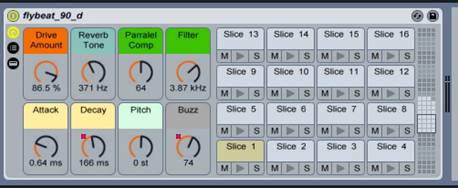
(buzz_audio_example)
Chord & Stutter – Chord and stutter is a repeater preset. You can specify the rate of the stutter, how many times each stutter will repeat, the length and pitch of the stutter and even throw in some grit. This preset creates effects that are somewhat similar to beat repeat.
Hint: Speed the stutter up to create some cool glitch effects that are ideal for all types of electronic music.
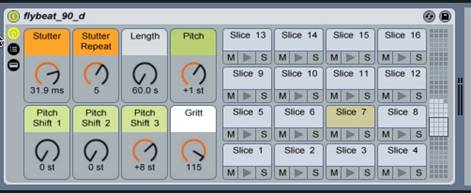
(stutter_audio_example)
Compressed (reverb) – Just as the name implies, when you slice to new MIDI with this preset your macro controls will incorporate some reverb and compression parameters for processing.
FM Beat Driver – Makes use of a vocoder formant, an FM modulator, and delay. This preset can create some quirky sounds if that’s what you’re shooting for.
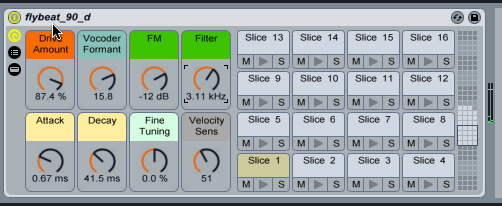
(FM_beat_audio_example)
Peach Fuzz – This is one of my favorite presets. Great for dirtying up a nice breakbeat. The sound it creates is somewhat difficult to describe, so here’s an audio example and a look at the macro controls, which should give you a pretty good idea.
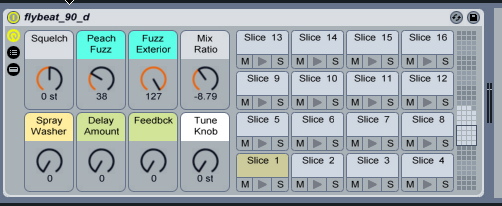
(fuzz_audio_example)
Slicer Dicer – Another great preset for industrial music and DnB. It makes use of pitch shifting, gating and some bit distortion.
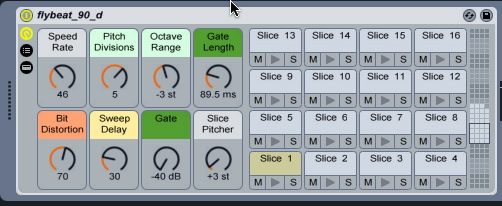
(slicer_dicer_audio_example)
Slow Riser – allows you to create some cool rising tones over the top of your loop. This is great for transitional FX.
Hint: After slicing, program in a long kick roll that increases from ¼’s to 32nd’s to create a cool transitional fill in your next track.
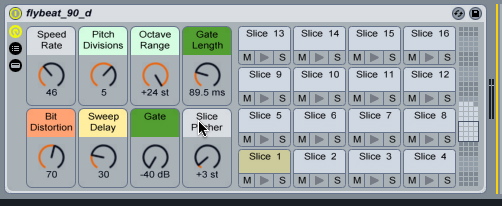
(slow_riser_audio)
Triplet Armada – We find this preset the least useful. The macro controls just don’t seem like they go well together and the sound shows. Take a listen and decide for yourself.
(triplet_armada_audio)
Creating Your Own Presets
Creating your own ‘Slice To MIDI’ presets is a great way to customize your macro controls section so it benefits your needs the most. If there is a certain combination of effects/controls that you like to use in conjunction with each other, simply assign them to your macro controls and save that preset so it’s available to you in the future.
Using The Slice To MIDI Feature On Other Types Of Loops
In addition to drum loops, you can slice any audio to MIDI. However, we’ll say that this feature works best on audio sequences with a percussive attack and quicker decay. Instruments with long decays and sustains tend create some noise artifacts, especially when notes in a sequence bleed together. In the event this is a problem you may have to manipulate the start and stop points of a given slice.
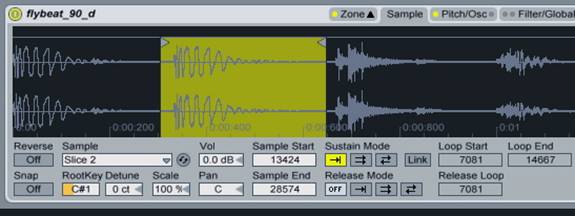
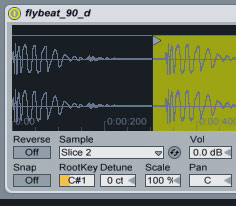
In this image, slice 2 is off. Our slice is highlighted in green, and as you can see there is some dead space in front of the slice before that next sound is triggered. To fix this, simply click on and drag the left edge triangle within the green box to fix the start point.
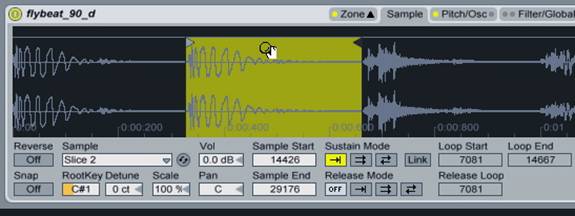
Try slicing vocals to MIDI to create some cool vox effects.
Ableton’s ‘slice-to-MID’I feature is a great tool for working with drum loops. Without a doubt, the thing we like most about this tool is the fact you can instantly create drum kits from your drum loops. When you purchase one of our drum loop packs from Silicon Beats you have a whole world of kits immediately at your disposal because of this technology. You can potentially build a massive catalogue of drum kits with little effort at all.
If you found this tutorial helpful please be sure to like our Facebook page where we post freebies, updates, and sales, from time to time.