
In today’s demonstration we’ll teach you how to create a rough but bangin’ Dubstep remix in a matter of minutes using quality loops and samples.
Here’s a snippet of the Dubstep remix we’ll be creating. We’ve given it a Punk twist just because we got our hands on some interesting Punk samples which suite the vibe.
Here’s a snippet of the original song. It’s from a Punk Band that we worked with called ‘Falls End’. Check those guys out if you’re looking for some good Punk music.
Note: the loops used in the remix were taken from Epic Metal Drums and Epic Dubstep Samples from PlatinumLoops.com
Getting Started
Step 1 – Load the song you want to remix into your DAW and start looking for sections that you can sample.
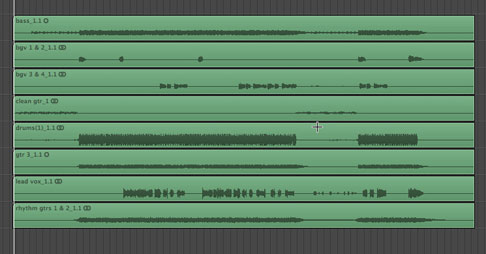
Figure 1: Original Track Stems
Looking at the track stems gives you a good indication of where to start searching for your samples. If we look at the stems in Figure 1, we’d say the intro and the breakdown late in the song would be where to start searching.
Step 2 – Extract your samples from the song and turn it into a loop-able segment.
In this case, we took the guitar part from the breakdown in the original song and created an intro and hook for the remix. We also sped it up a bit to get it in the range of 140 BPM, which is typical for Dubstep.
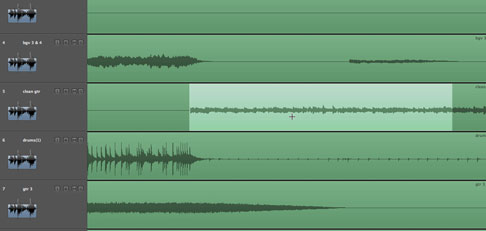
Figure 2: Highlighted region shows the guitar part we intend to sample.
To alter the tempo of your sample you will need to take advantage of the sampling technology in your DAW. We used Logic Pro’s Flex Time to speed up the loop while still preserving its native pitch.
For more information on working with Flex Time to manipulate samples be sure to check out this tutorial video from Platinum Loops. How To Use Flex Time in Logic.
Step 3 – Pick out some dirty Dubstep bass lines and drums.
We started by pulling up the product folder for Epic Dubstep from Platinumloops and began auditioning bass lines until we found a few we liked. We then pulled them into Logic.
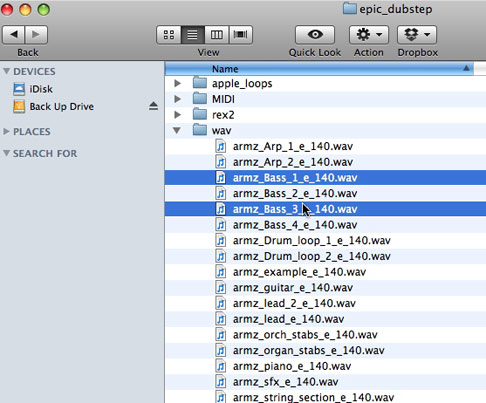
Figure 3: Epic Dubstep product folder with selected bass loops highlighted
Note: We recommend you pick loops that are in the same key as the original song unless you intentionally want to change the key. Otherwise, chances are they won’t mesh well.
Repeat Step 3 and find some hard hitting drum loops. The drum loops in this remix came from Epic Metal Drum Loops. Click on the link and you can download some free demo loops to try out.
Step 4 – Begin arranging your track
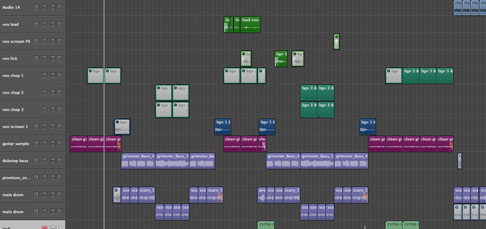
Figure 4: Arrangement of Remix
Give your self a good 8 to 12-bar intro using your sample from the original track and then segue into your Dubstep drum and bass drop – similar to this:
Step 5 – Spice your remix with some attention to detail
Once you have a general arrangement for your remix, you can begin to show your track some TLC and really spice it up.
You’ll need to create some cool effects like build-ups, breakdowns, drops, transitions, vocal cuts, etc. – basically all of the bells and whistles you can think of.
We started with some vocals cuts to give the intro some flair.
To create this vocal effect we found some vocals from the original track, cut the segments into slices (or regions), convert them to MIDI, and sequenced in some MIDI info.
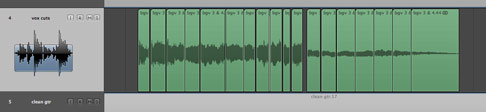
Figure 5: Vocal cuts ready to be converted to MIDI.
Converting your vox cuts into MIDI is as simple as highlighting all of your cuts, Control + clicking on them, scrolling down to Convert and choosing Convert To New Sampler Track.
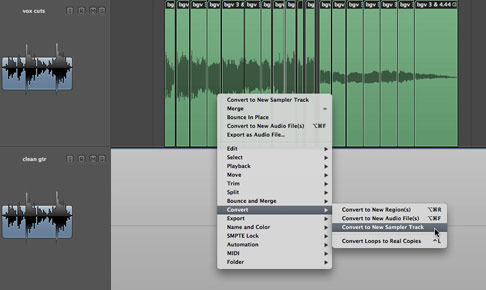
Now you should be able to use your MIDI controller to trigger these cuts and sequence in a chopped up melody.
Process your vox cut with some Autotune, reverb, phasing and delay and you should get something like this.
After you have some cool vocal chops, start spicing up your song transitions (intro-to-verse, verse-to-hook, etc.) with FX and fills. For example, we used a 2 bar drum fill and a pitch drop on the guitar to spice up our intro-to-verse transition.
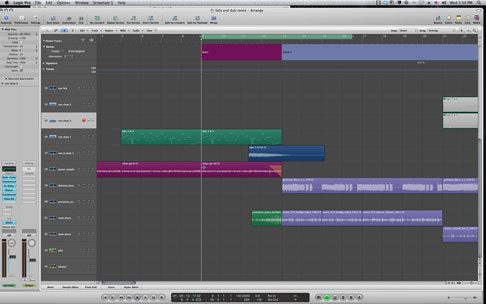
Figure 6: Intro-to-Verse transition.
Summary
Doing the little things that give your song more appeal takes time but it can mean the difference between a good remix and a great one, so don’t get lazy and overlook it.
If you get your hands on some quality Dubstep samples, like the ones used in this demonstration, you will be able to create hot Dubstep remixes without any trouble at all. The only thing you’ll have to decide is what samples you want to use, and how you want arrange them to create your remix.